White paper

Waypoint White Paper
Waypoint is a protocol platform for EMS agencies: one place to write, review, approve, publish and read clinical protocols, built so the version a medic opens on scene is always the version the medical director approved.
Overview
Most agencies still keep protocols as PDFs or binders. Updates are slow to reach crews, doses are copied by hand into several documents and drift apart, and there is no clear record of who approved what or who has read the latest change. Waypoint replaces that with structured protocols, linked medication doses, a built-in approval process and a provider app that works with no signal.
A handful of useful apps already put protocols on a phone, but they stop at reference. Writing, reviewing, approving and controlling versions still happens somewhere else, in email threads, shared drives and meeting minutes. Waypoint is one platform for all of it: the field reference, document control and the approval process, so the protocol a crew reads is the same record the committee reviewed and the medical director signed off.
The first deployment, Waypoint for NWA EMS, carries the Northwest Arkansas Regional EMS Guidelines: 114 clinical protocols and procedure guides and 58 medication cards. Waypoint is developed by Strange Harmony, which loads each new agency's protocols as part of setup.
Built for the field
Providers mostly reach Waypoint from a phone in the back of a truck, so the reading side is built for fast lookup and for working without a signal.
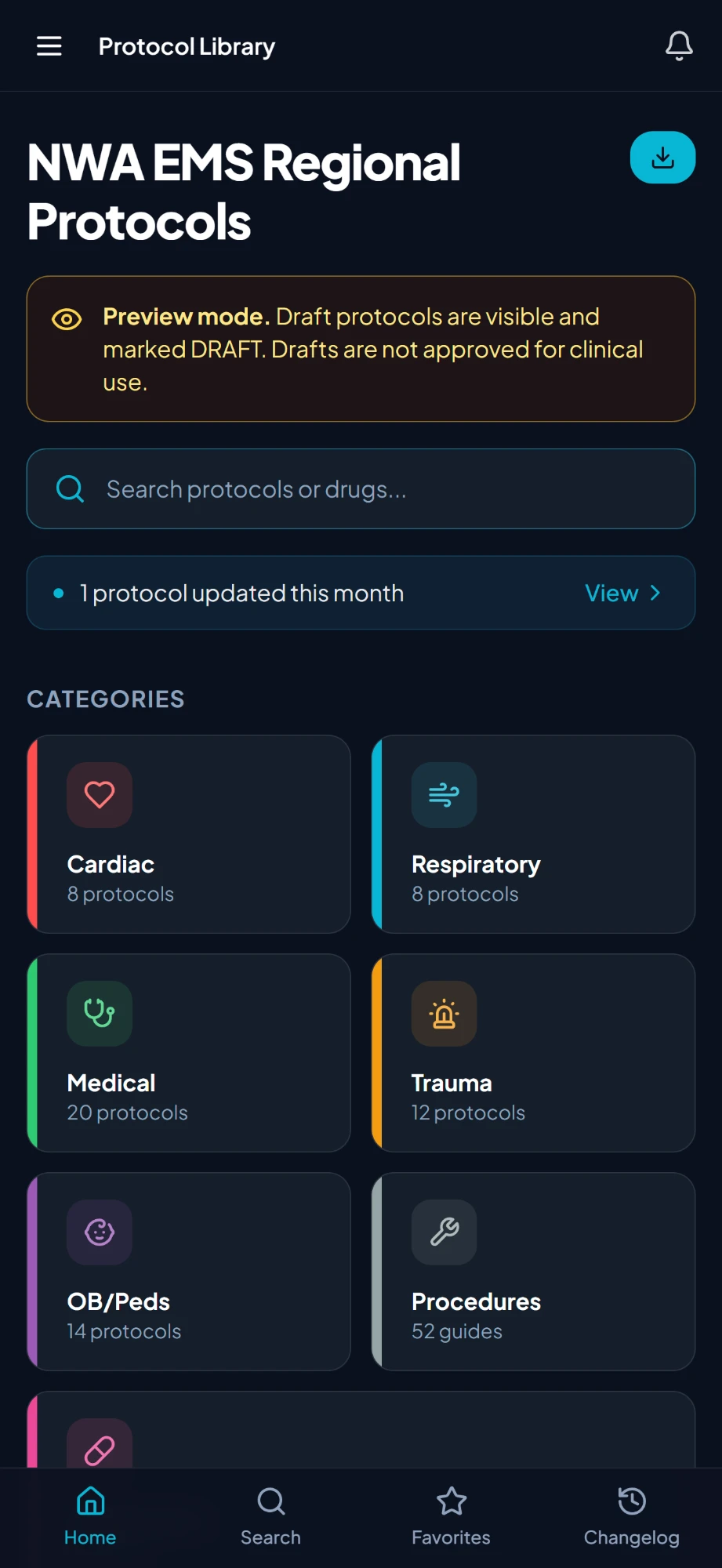
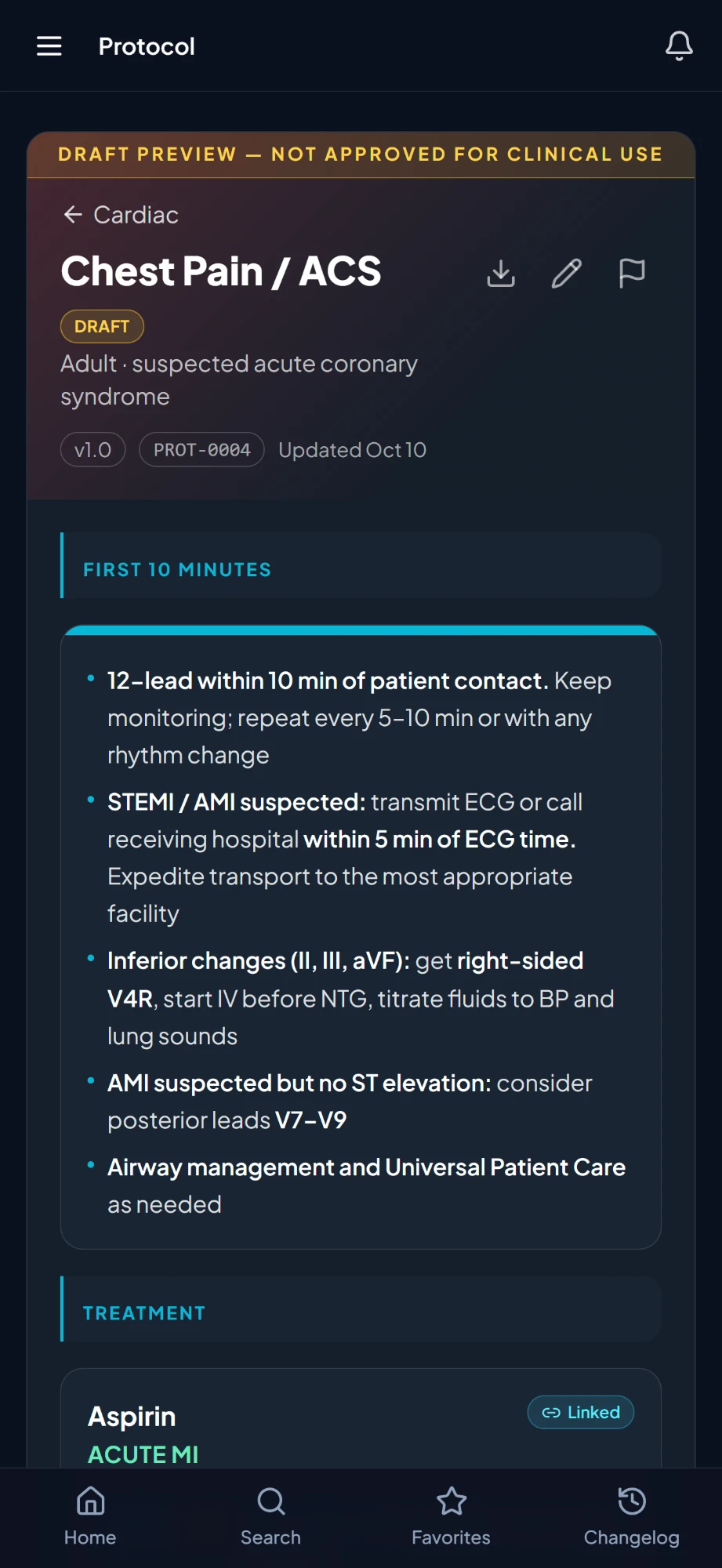
- Library and search. Protocols are grouped by category (Cardiac, Respiratory, Medical, Trauma, OB/Peds, Procedures, Medications) with an A to Z medication list, search by name, and favorites one tap away.
- Works offline. Waypoint installs from the browser like an app and keeps a copy of the protocols on the device. With no signal, the library, search, favorites, medications and full protocols still open, and a banner shows when the copy was last updated.
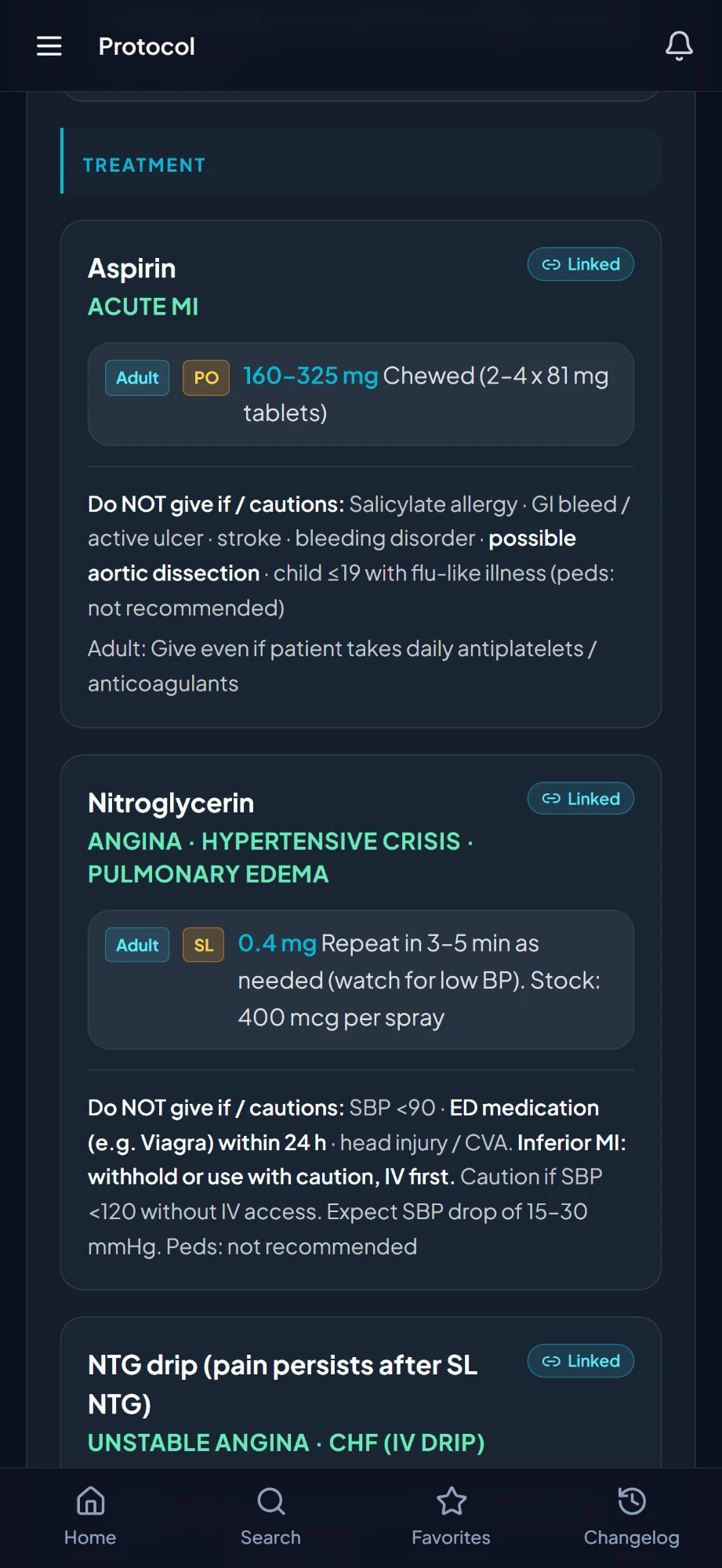
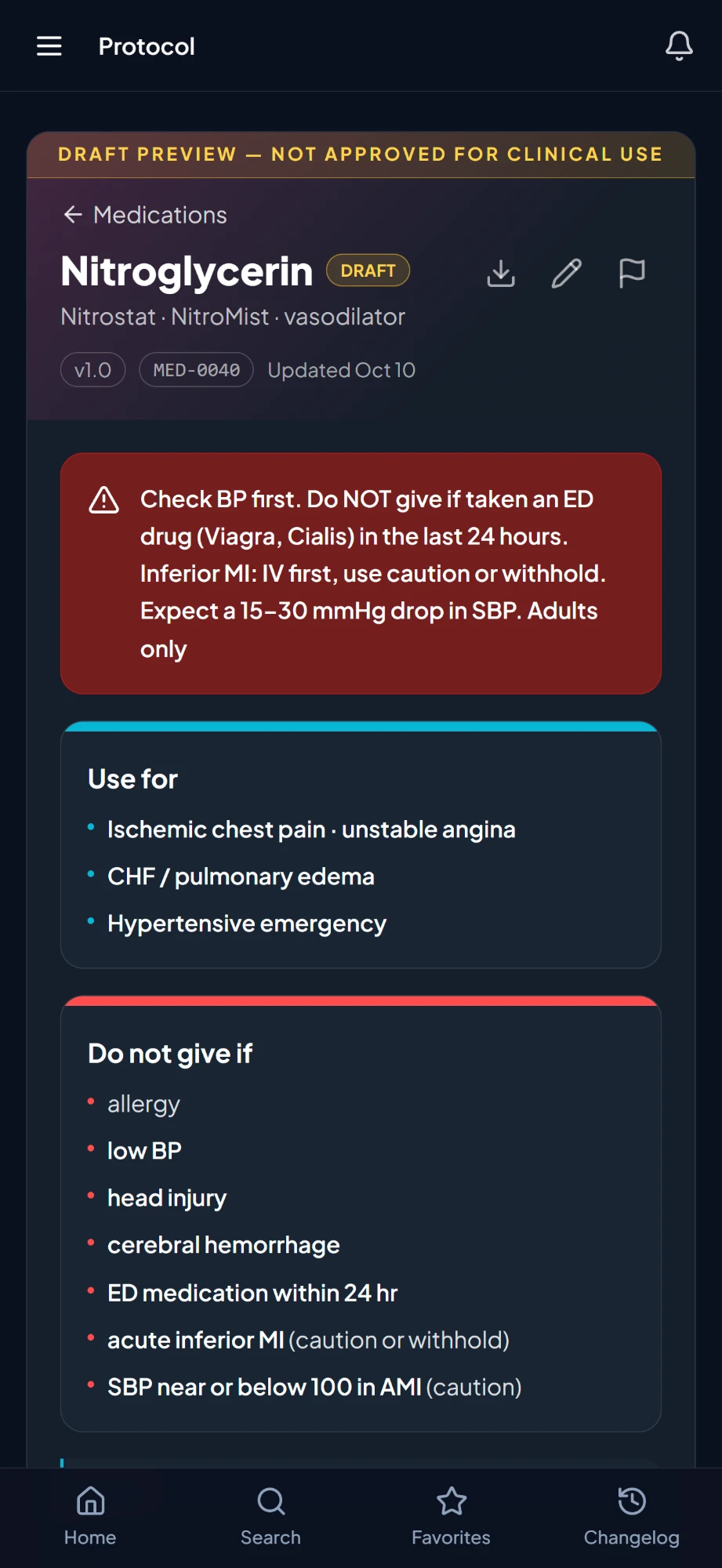
- Readable drug cards. Each dose sits on its own row with an Adult or Peds tag, the route highlighted, then the dose, so the right line is easy to find under stress.
- Print and PDF. Any protocol prints or exports to PDF with doses resolved, warnings at the top and references at the end.
- Acknowledgement. When a revision needs it, providers see a banner and confirm they've read the new version, and administrators can see who has and hasn't.
- Staying informed. A changelog, in-app notifications, email notices, a daily digest and home-page announcements keep crews current.
- Guest access. An agency can open its library to visitors without accounts, behind terms of use and a visitor log, for neighboring services, students or the public.
Structured protocols
In Waypoint a protocol is structured content, not a document file, so the same protocol renders cleanly on a phone, on paper and as a PDF, and its doses stay linked to the medication they come from.
Each protocol is built from typed blocks:
| Block | Used for |
|---|---|
| Callout | Warnings, cautions, tips and pediatric notes, each with its own icon and color |
| Section header | Grouping the steps under it |
| Numbered steps | Ordered treatment sequences |
| Drug card | One medication for one indication, with its dose lines |
| Condition card | A titled card of bullet points and short paragraphs |
| Table | Charts such as energy settings, IO sites and tidal volumes |
| Cross-reference | Links to related protocols |
| Note | Free text |
| Attachment | Diagrams and reference sheets, optionally included in print |
Every block can be scaled up or down so the most important content stands out.
Metadata. Each protocol carries a category, care level (BLS, ALS or both), population (Adult, Peds or both), owning committee, medical director and version.
Protocol numbers. Every protocol gets a stable number (for example PROT-0042, or MED-0012 for medications) shown on its page, so crews and committees can refer to it without ambiguity.
Sources. Each protocol lists the references it is based on, shown under the content and on printed copies.
Authoring
Protocol administrators edit in a two-column editor, with the blocks on one side and a live preview of the provider's page on the other.
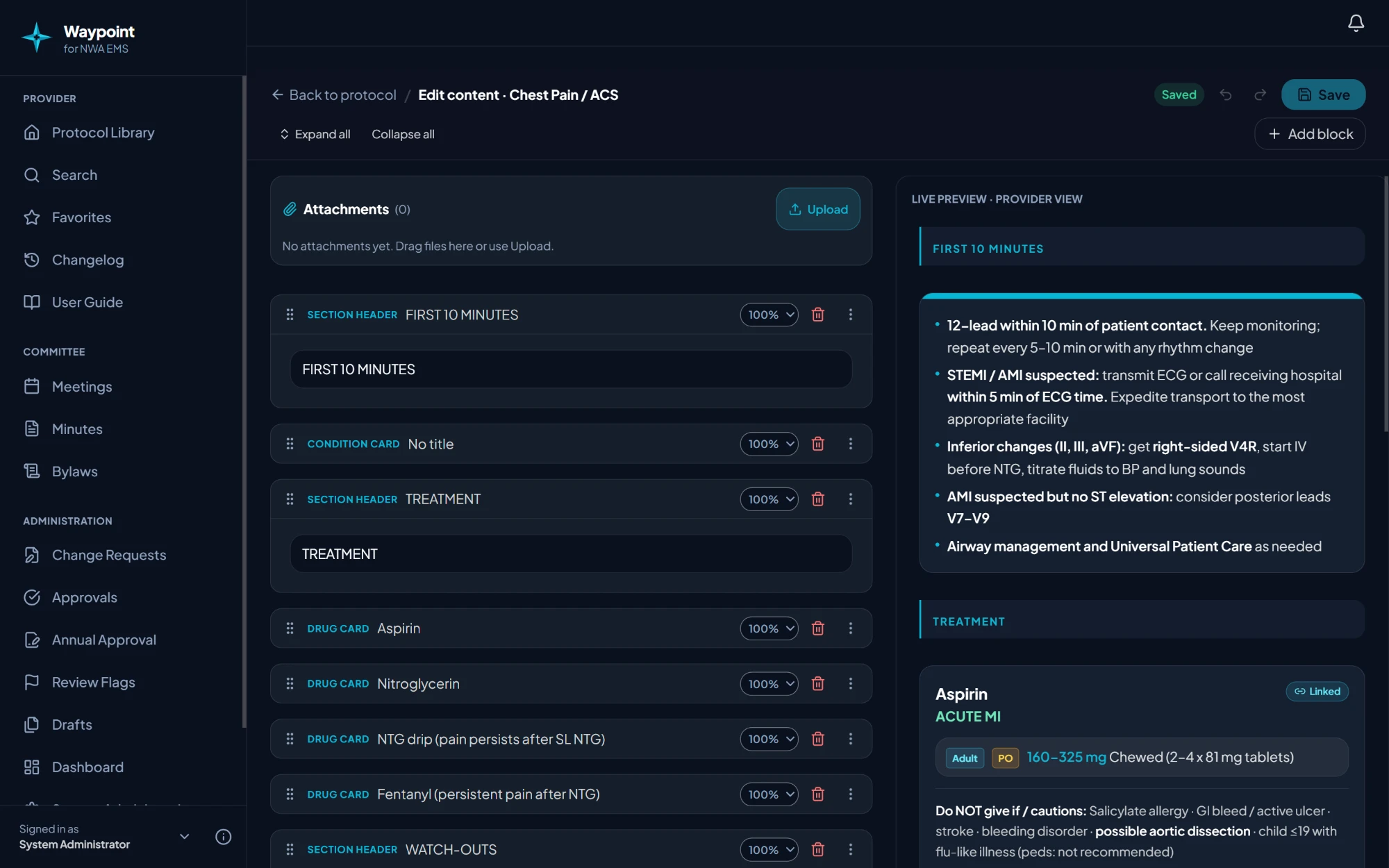
- Rich text everywhere. A toolbar floats above the block being edited: bold, italic, underline, strikethrough, colors and text sizes, in steps, notes, callouts, cards, tables and headers.
- Protocol links. Select text, search any protocol by name or number, and the text becomes a link that opens that protocol for providers.
- Inline doses. A Dose button inserts a live medication dose at the cursor, tagged Adult or Peds with the drug name. It always shows the medication's current dose, never a pasted copy.
- Drafts and checkpoints. Drafts keep a history of saved checkpoints that can be restored, and any draft can be compared with the published version before it goes live.
- Import. Existing protocol documents are uploaded and turned into Waypoint drafts automatically, then reviewed screen by screen. This is how an agency's current protocol set comes into Waypoint.
- Review flags and AI review. Reviewers flag text that needs attention and track each flag to a fix. An AI review checks protocols against national guidance (AHA, NASEMSO, NAEMSP, ACS, drug labeling and scope of practice) and files advisory findings with the cited guideline. Findings are suggestions for the committee, never automatic changes.
One source of truth for medications
Every dose in Waypoint comes from a single medication card, so a dose is written once, approved once and changed once.
Medication cards hold labeled dose lines for each indication. Each line has one route, the dose, repeat guidance and notes, plus structured numbers: amount per kg, maximum single and total dose, drug concentration and weight limits. Storing the numbers, not just the text, prepares each line for weight-based dose calculation.
Drug cards in clinical protocols link to a medication card by indication. Inline doses in text link the same way. A Linked badge on the card opens the medication's own page.
When a dose changes, Waypoint finds every protocol that uses it, updates the linked doses in drafts, and flags affected published protocols for re-approval. Printed copies and PDFs always resolve the current dose, so no stale copy survives in a corner of the protocol set.
In the NWA EMS set, 25 clinical protocols share 89 linked drug cards drawn from 58 medication cards.
Governance
Waypoint gives every protocol change a documented path from request to field, with a permanent record of who asked, who approved and who has read it.
- Change requests. Anyone with the right role proposes a change with its reason, priority, evidence and the protocols it affects. Discussion and attachments stay on the request.
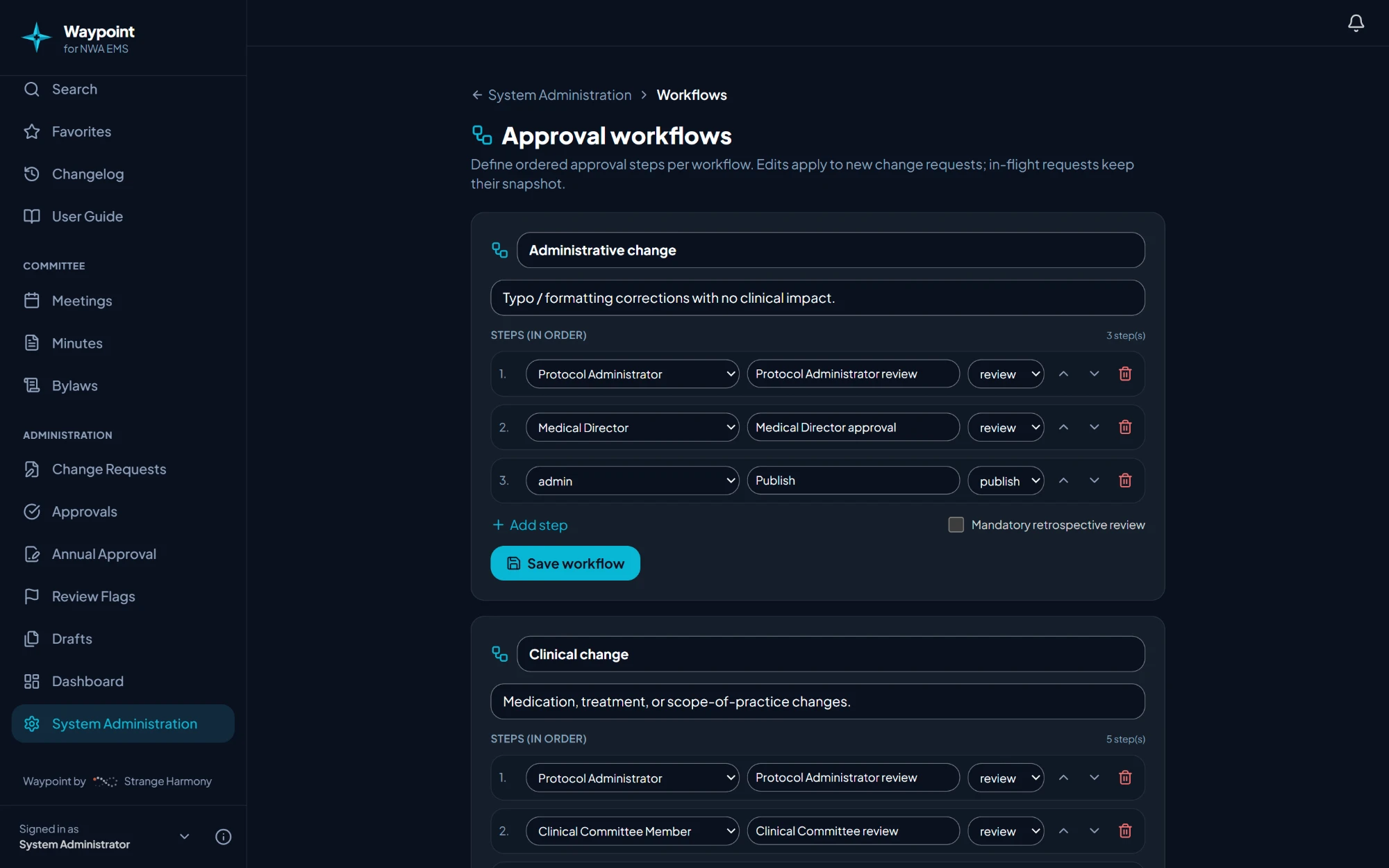
- Configurable workflows. Each agency sets its own ordered review steps by role, for example committee review, then medical director approval, then board sign-off. Emergency changes can be published first and reviewed after.
- Versioning. Every publication saves a locked version with its change type, reason and approvals. Published versions can never be edited or deleted. Older versions can be compared or restored.
- Scheduled publication. Approved changes can go live on a set effective date.
- Acknowledgement. Changes that matter to crews can require each provider to confirm they've read them.
- Audit trail and backups. An append-only audit log records administrative and content actions, and regular snapshots allow a guided restore. Protocols are archived, never silently deleted.
Access and security
Waypoint is invitation-only and role-based, and every permission is enforced on the server as well as in the app.
- Invitation-only accounts. People request access with their organization and rank, and an administrator approves or denies each request. Unapproved accounts see nothing.
- Roles that match an EMS system. Provider, Agency Protocol Representative, Clinical Committee Member, Medical Director, Regional Board, Committee Secretary, Protocol Administrator and System Administrator. Each agency can adjust most permissions per role in a permission matrix.
- Two-factor sign-in. Anyone who can edit or approve protocols must use an authenticator app, so a stolen password alone can't change clinical content. Providers can turn it on if they choose.
- Data protection. Every record is guarded by row-level rules in the database, files are served through short-lived signed links, and administrative actions are recorded in a log that can't be altered.
- Security review. The platform was security-reviewed during development and the findings were fixed before new features continued.
Bringing Waypoint to your agency
Strange Harmony sets up each agency's Waypoint and loads its protocols, so the agency starts with its own content, numbered and linked, rather than an empty editor.
- Import. Your current protocols and medication references are imported as drafts, with numbers assigned and drug cards linked to medication cards.
- Review. Your committee and medical director review the drafts in Waypoint, using review flags and the optional AI review against national guidance.
- Configure. Roles, permissions, approval workflows, email templates and guest access are set to match how your system governs protocols.
- Brand. Your instance carries your name in the "Waypoint for Your Agency" lockup, with matching app icons.
- Launch. Protocols are published, crews are invited, and every change from then on follows your approval workflow.
What's coming
- Native iPhone and Android apps with push notifications and full offline download
- A patient-first view with a weight entry that calculates each dose in mg and mL, after medical director review of the dose numbers
- A step-by-step mode for working through a protocol on scene, with repeat-dose timers
About Strange Harmony

Waypoint is designed and built by Strange Harmony, which works with each agency from protocol import through launch and supports it afterward. Waypoint grew out of daily use in a working regional EMS system, and its features come from the people who write, approve and use the protocols.
To talk about Waypoint for your agency, visit strangeharmony.com.
Strange Harmony home